





Intensive
Stain Removal

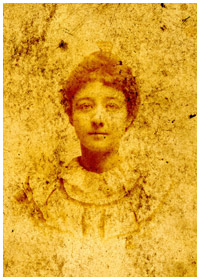
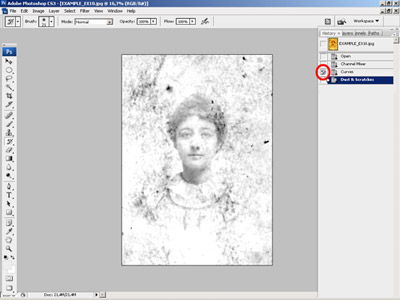
This photo restoration process consists of several steps:
- remove intensive stain with
Mixer Chanel;
- remove minor flaws with Dust and Scratch
filter;
- selectively applying Dust
an Scratches filter to
face
- paint the face with photoshop tooks/


Remove intensive Stain with Mixer Chanel
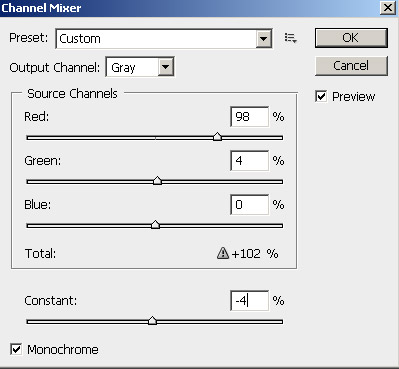
We can remove dirtiest channel (usually it Blue chanel )
However as the resulting image will be grayscale and we loose the semitones.
So we will remove stain with Mixer Chanel.
Select Monochrome option to modify each channel separately.
Use -> Image ->Adjustment -> Chanel
Mixer
Red :
98%;
Green:
+4%;
Blue :
0;
Contrast :
-4%.

*****************************************************************************

Add Contrast using Curves
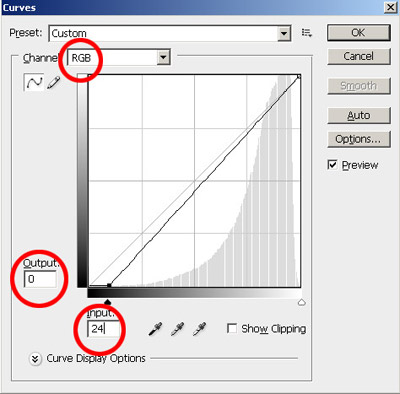
Add Contrast using Curves:
Image ->Adjustment -> Curves
(Ctrl + M )
Input:
24;
Output:
0;
Chanel
: RGB.
;

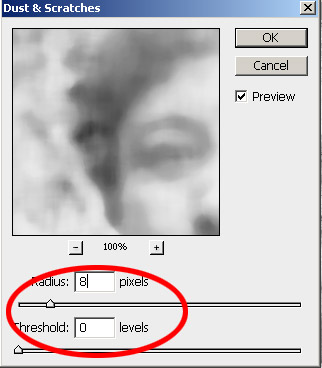
Remove minor flaws with Dust and Scratch filter
Use: Image -> Noise -> Dust and Scratches:
Radius:
24px:
Threshold:
0px


1 | 2